As part of Microsoft’s aim to make mixed reality (MR) more accessible and intuitive for frontline workers everywhere, the company has recently announced a host of new features for its Dynamics 365 Guides platform for deskless workers.
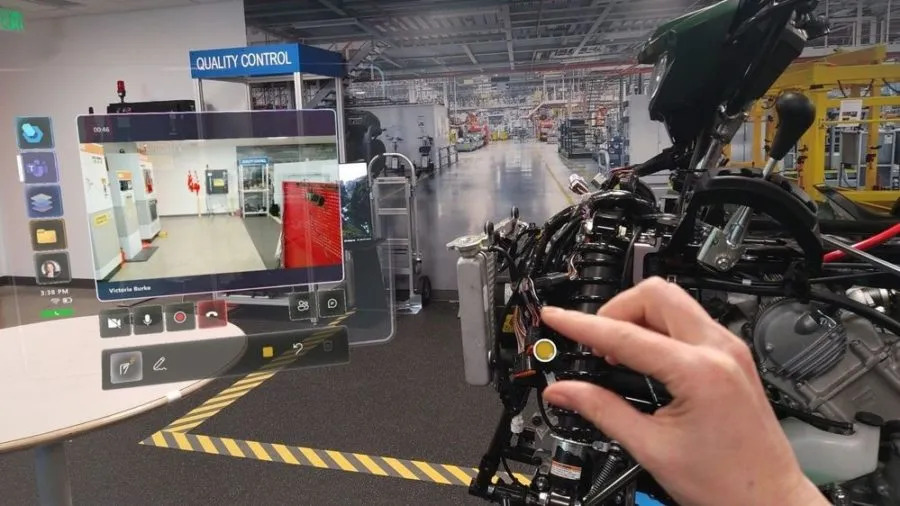
With Dynamics 365 Guides, workers can use step-by-step holographic instructions to ensure process compliance, improve efficiency, and learn on the job. In 2022, Microsoft integrated Teams capabilities into the Guides platform, enabling users to collaborate with anyone anywhere in the world seamlessly. This also meant that users could call through the HoloLens 2 mixed reality headset – allowing remote participants to “see-what-I-see” through the HoloLens user’s eyes in real-time, and be able to annotate on the 3D space surrounding the HoloLens user via mixed reality.
The most recent new features include:
Drawing and annotations
On Dynamics 365 Guides and Remote Assist, an expert (working on a PC or mobile device) can draw on the HoloLens wearer’s world in 3D. Frontline workers wearing the HoloLens can also draw on their surrounding space in digital ink.
Previously, HoloLens users could only draw on a flat or semi-flat surface some ways off in the distance. With the latest annotation improvements, users can now draw anywhere in their space in 3D. Drawings stick where they are added in the space and remain still, meaning that users can walk around them and view them from different angles.
Similar improvements have been introduced for annotating on surfaces so that annotations stay where intended, regardless of whether the user changes location or position.

Mixed Reality Teams calls
With Dynamics 365 Guides, HoloLens users now have more pre-join settings when joining a Teams call. Before entering the call, users can opt to toggle on/off video and can choose whether to mute themselves. As before, users can also toggle these settings once they are in the meeting. In spaces where confidentiality is core, this allows frontline workers to use the HoloLens as their main calling device – without compromising on security.
Restricted mode features have also been recently added, which enable admins to restrict who can log on to devices and make calls.

Linking to Guides from within a Guide
Microsoft has added the ability to link directly from one guide to another by linking the new guide in an action step. As a result, users can now more easily navigate between different sets of training materials or guides, in a similar way that they would jump to a new web page from a hyperlink.
Microsoft noted that more updates for Dynamics 365 Guides will be coming soon as the company continues to build on its frontline worker-focused features for the platform. For more information on Microsoft’s mixed reality solutions, click here.
Quelle:
Image credit: Microsoft